AWS · Amazon EC2 and CloudWatch
Nimbox SRE automatically discovers an EC2 instance and reads CloudWatch without storing access keys. The agent uses IMDSv2 and temporary instance profile credentials.
1. Create the IAM role
In IAM → Roles → Create role, select AWS service → EC2. Attach this read-only policy:
{
  "Version": "2012-10-17",
  "Statement": [{
    "Effect": "Allow",
    "Action": [
      "sts:GetCallerIdentity",
      "cloudwatch:GetMetricData",
      "cloudwatch:DescribeAlarms"
    ],
    "Resource": "*"
  }]
}
Do not use static keys
Do not add AWS_ACCESS_KEY_ID or AWS_SECRET_ACCESS_KEY to the agent. The instance role is provided through IMDSv2 and rotates credentials automatically.
2. Attach the role to the instance
Go to EC2 → Instances → select instance → Actions → Security → Modify IAM role, select the new role, and save.
Keep IMDSv2 required where possible. Nimbox SRE uses its token to identify the EC2 instance.
3. Install the agent
In Nimbox SRE, open Install agent, copy your tenant command, and run it as root:
curl -fsSL https://app.nimboxsre.com/install.sh | sudo sh -s -- --token YOUR_TOKEN
The installer detects the architecture, installs nimboxsre-agent as a systemd service, and sends a test payload.
4. What appears on the host page
The Amazon Web Services · EC2 section displays:
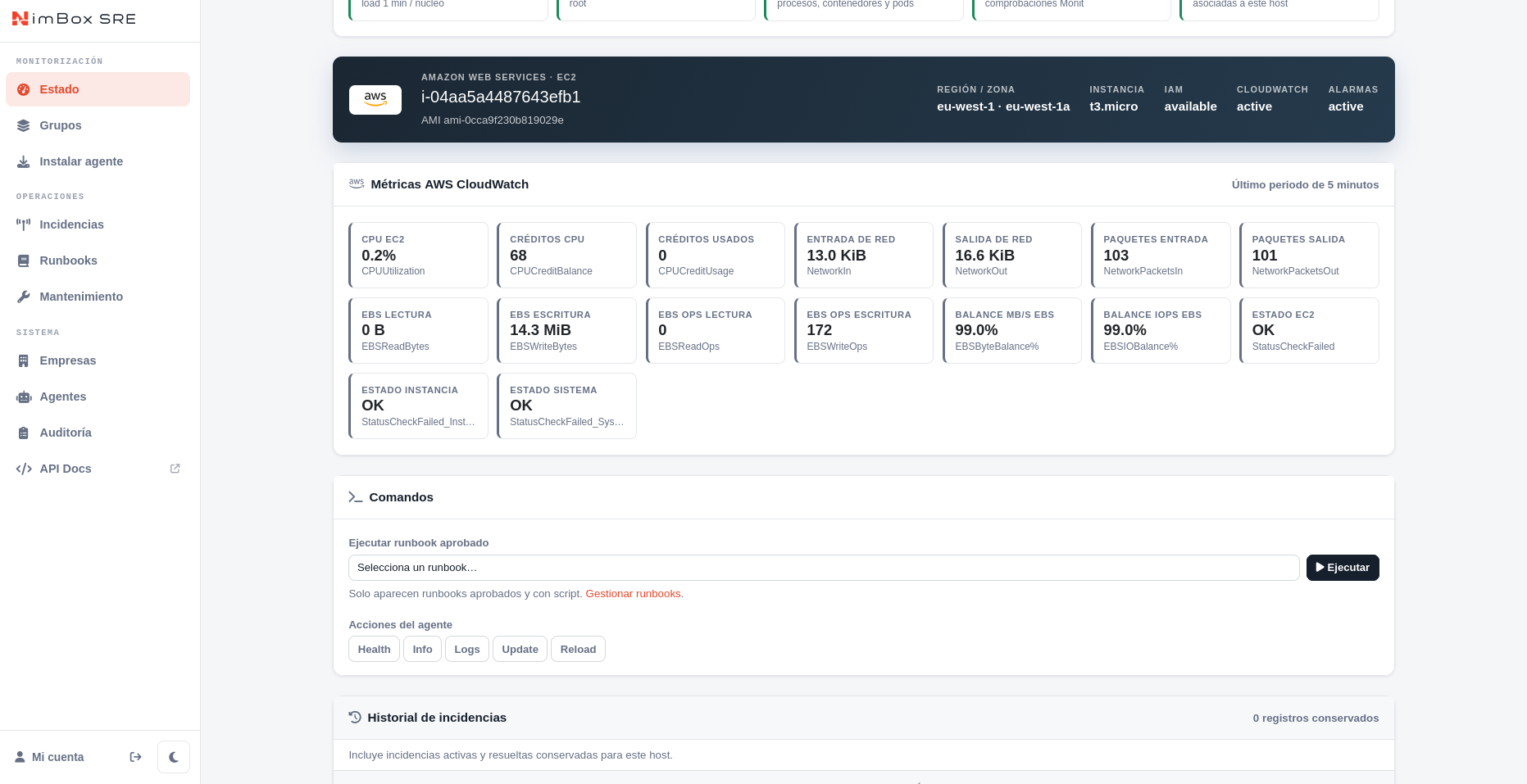
When an alarm returns to OK, the agent reports the resolution. pending, denied, and unavailable are informational and do not create incidents on their own.
Quick troubleshooting
| Symptom | Action |
|---|---|
| AWS is not shown | Confirm the host is EC2 and IMDSv2 is reachable. |
IAM missing |
Attach an instance profile. |
IAM or CloudWatch denied |
Review IAM policy permissions. |
CloudWatch pending |
Wait a few minutes for a newly created EC2 to produce samples. |
| No alarms | Check cloudwatch:DescribeAlarms and the alarm's InstanceId dimension. |
Current scope
The current integration collects the EC2 metrics above and instance-bound alarms. EBS, RDS, ALB, Lambda, Logs, and custom metrics will be added through the central AWS Collector integration.